This page was generated from
docs/source/examples/compound2.ipynb.
Plotting with scalar data#
We are about to build a compound mesh by transforming parts of a voxlized cylinder into tetrahedra and lines. Then we do some plotting and review the basics of configuring plots.
[4]:
from polymesh.space import CartesianFrame
from polymesh.recipes import cylinder
from polymesh import PolyData, LineData, PointData
from polymesh.cells import H8, Q4, L2
from polymesh.utils.topology import H8_to_L2, H8_to_Q4
from polymesh.utils.topology import detach_mesh_bulk
from polymesh.utils.space import frames_of_lines, frames_of_surfaces
from neumann import minmax
import numpy as np

min_radius = 5
max_radius = 25
h = 50
angle = 1

shape = (min_radius, max_radius), angle, h
frame = CartesianFrame(dim=3)
cyl = cylinder(shape, size=5.0, voxelize=True, frame=frame)

coords = cyl.coords()
topo = cyl.topology()
centers = cyl.centers()

cxmin, cxmax = minmax(centers[:, 0])
czmin, czmax = minmax(centers[:, 2])
cxavg = (cxmin + cxmax) / 2
czavg = (czmin + czmax) / 2
b_upper = centers[:, 2] > czavg
b_lower = centers[:, 2] <= czavg
b_left = centers[:, 0] < cxavg
b_right = centers[:, 0] >= cxavg
iL2 = np.where(b_upper & b_right)[0]
iTET4 = np.where(b_upper & b_left)[0]
iH8 = np.where(b_lower)[0]
_, tL2 = H8_to_L2(coords, topo[iL2])
_, tQ4 = H8_to_Q4(coords, topo[iTET4])
tH8 = topo[iH8]

pd = PointData(coords=coords, frame=frame)
mesh = PolyData(pd, frame=frame)

cdL2 = L2(topo=tL2, frames=frames_of_lines(coords, tL2))
mesh["lines", "L2"] = LineData(cdL2, frame=frame)

cdQ4 = Q4(topo=tQ4, frames=frames_of_surfaces(coords, tQ4))
mesh["surfaces", "Q4"] = PolyData(cdQ4, frame=frame)

cH8, tH8 = detach_mesh_bulk(coords, tH8)
pdH8 = PointData(coords=cH8, frame=frame)
cdH8 = H8(topo=tH8, frames=frame)
mesh["bodies", "H8"] = PolyData(pdH8, cdH8, frame=frame)

mesh.to_standard_form()
mesh.lock(create_mappers=True)
[4]:
PolyData({'lines': PolyData({'L2': PolyData({})}), 'surfaces': PolyData({'Q4': PolyData({})}), 'bodies': PolyData({'H8': PolyData({})})})
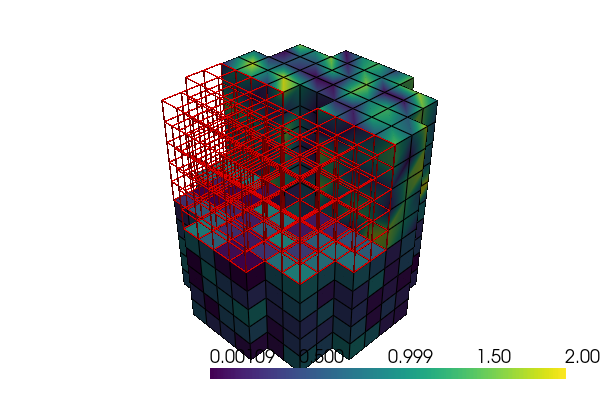
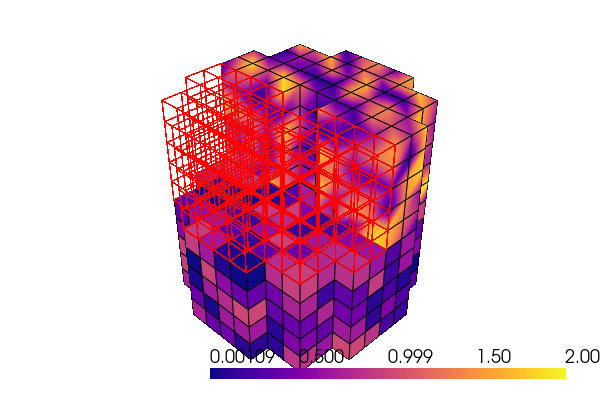
We can assign colors by setting numerical data on points or cells. All we have to do is to provide the keyword argument scalars to PyVista. One way to do that is to add these walues to the configuration of your block of choice. For example, to set random data on H8 hexagonals, do this:
[5]:
mesh["lines", "L2"].config["pyvista", "plot", "color"] = "red"
mesh["lines", "L2"].config["pyvista", "plot", "line_width"] = 1.5
mesh["lines", "L2"].config["pyvista", "plot", "render_lines_as_tubes"] = True

mesh["bodies", "H8"].config["pyvista", "plot", "scalars"] = np.random.rand(tH8.shape[0])
ncTET4 = mesh["surfaces", "Q4"].coords(from_cells=True).shape[0]

mesh["surfaces", "Q4"].config["pyvista", "plot", "scalars"] = 2 * np.random.rand(ncTET4)
mesh["surfaces", "Q4"].config["pyvista", "plot", "opacity"] = 1.0

mesh.pvplot(
    notebook=True,
    jupyter_backend="static",
    window_size=(600, 400),
    config_key=["pyvista", "plot"],
    cmap="plasma",
    theme="document",
)
[6]:
import pyvista as pv

plotter = pv.Plotter(theme=pv.themes.DocumentTheme())
plotter = mesh.pvplot(
    plotter=plotter,
    config_key=["pyvista", "plot"],
    return_plotter=True,
)
plotter.show(jupyter_backend="static", window_size=(600, 400))